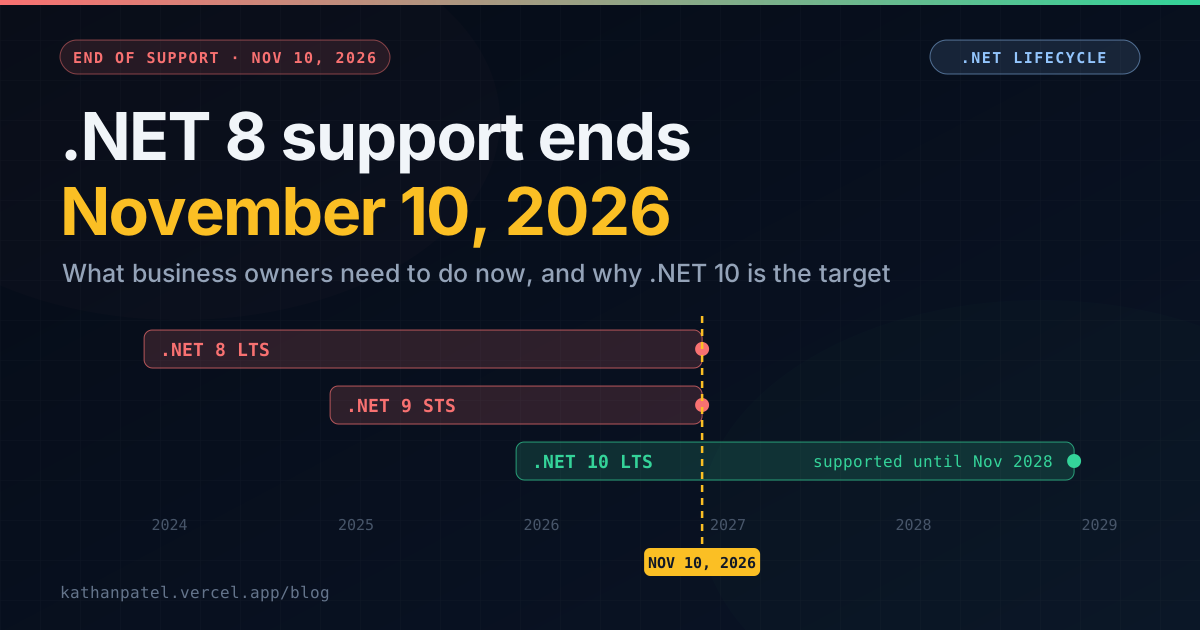
If your business software was built or upgraded in the last three years, there's a good chance it runs on .NET 8. It was the sensible choice at the time: a long-term support release, backed by Microsoft for three years.
Those three years end on November 10, 2026. .NET 9 reaches end of support on the same day, because Microsoft extended its standard-term releases to 24 months. So both current versions go out of support together.
This post is for the person who has to decide what to do about it: the owner, the operations lead, the CTO of a small team. It covers what actually happens on that date, how to find out whether it affects you, and what the move to .NET 10 usually involves.
What "end of support" actually means
Nothing breaks on November 10. Your app will start the next morning as usual. What stops is Microsoft's security patching. Any vulnerability found in .NET 8 after that date stays unfixed, permanently.
For an internal tool on a locked-down network, that risk grows slowly. For anything that faces the internet (a customer portal, an API a partner calls, a web app your staff use from home), it's a real exposure, and it gets worse every month as new vulnerabilities are published and left unpatched.
Most businesses feel three practical consequences long before they feel an actual attack:
Security scans start failing. Vulnerability scanners and penetration testers flag unsupported runtimes as findings. If a client or partner scans you, it shows up in their report too.
Compliance questions get harder. Frameworks like SOC 2, ISO 27001 and PCI DSS expect you to run supported, patched software. So do many cyber-insurance questionnaires. "We're on an unsupported runtime" isn't an answer you want to write down.
Hosting and tooling move on. Cloud platforms, container images and build tools drop old runtimes on their own schedules. The longer you wait, the more of the surrounding pieces change at once.
End of support isn't the day your app breaks. It's the day every future security problem becomes yours to carry.— Kathan N. Patel
Does this affect you? A five-minute check
You don't need to read code to answer this. Ask whoever maintains the app, or check one of these yourself:
1. In the source code, open any file ending in .csproj and find the TargetFramework line. net8.0 or net9.0 means you're affected. net10.0 means you're covered until November 2028.
2. On the server, run dotnet --list-runtimes in a terminal. It lists every .NET version installed.
3. If you use Docker, look at the first line of each Dockerfile. An image tag ending in :8.0 or :9.0 means you're affected.
<!-- What to look for in a .csproj file -->
<PropertyGroup>
  <TargetFramework>net8.0</TargetFramework>   <!-- support ends Nov 10, 2026 -->
</PropertyGroup>

<!-- After the upgrade -->
<PropertyGroup>
  <TargetFramework>net10.0</TargetFramework>  <!-- supported until Nov 2028 -->
</PropertyGroup>
If you find something older, such as net6.0, net7.0 or netcoreapp3.1, you're already out of support and have been for a while. Everything below still applies; you're just starting further back. If you find net48 or similar, you're on the older .NET Framework, which is a different kind of move. I've covered that in the real costs of migrating from .NET Framework to modern .NET.
Why .NET 10, not .NET 11
.NET 10 was released in November 2025 as a long-term support (LTS) release, supported until November 2028. .NET 11 is due in November 2026 as a standard-term release, and under Microsoft's current 24-month policy its support also ends in November 2028.
So .NET 11 gives you no extra runway. It gives you newer features and a package ecosystem that has had less time to catch up. For business software, the LTS release is almost always the right target, and today that's .NET 10.
What the upgrade from .NET 8 usually involves
Good news first: moving from .NET 8 to .NET 10 is far smaller than the jump from the old .NET Framework. It's the same platform, two versions on. For many apps, the core change is the single line per project shown above.
The real work is everything around that line.
1. Package updates
Every library your app uses needs a version that supports .NET 10. Microsoft's own packages, like ASP.NET Core and Entity Framework Core, move in step. Third-party packages usually do too, but the occasional abandoned library won't, and that's where most surprises come from. A developer can list outdated and known-vulnerable packages in seconds:
# Packages with newer versions available
dotnet list package --outdated

# Packages with known security vulnerabilities.
# Worth running today, whether or not you upgrade yet.
dotnet list package --vulnerable --include-transitive
2. Breaking changes that hit real apps
Every release publishes a list of breaking changes. Most won't touch you. A few regularly do:
• BinaryFormatter is gone. Since .NET 9 it throws an error instead of running. Older code sometimes used it to save files, cache data or copy objects, and that code needs replacing.
• Entity Framework Core is stricter about database migrations. Since EF Core 9, applying migrations fails if the app's data model has changes that were never captured in a migration. That's a good safety net, but it can surprise a team on deployment day.
• Quiet changes in dependencies. Updated libraries sometimes change defaults for dates, serialization or authentication. These don't fail the build. They fail in testing, if you have tests.
3. Everything outside the code
Build pipelines, Docker images, server runtimes and hosting settings all need to move to .NET 10 too. It's routine work, but it's work, and it's the part that gets forgotten until deployment day.
4. Testing
This is what decides how long the whole thing takes. An app with a good automated test suite can be upgraded, tested and shipped quickly, because the tests show what broke. An app without tests needs careful manual testing of every important workflow. Often it's better to spend a few days writing tests around the critical parts first, and I'd usually recommend that.
How long it takes
Rough shapes, not quotes. The real answer depends on your packages and your tests:
• A single web app or API with current packages and some tests: typically a few days to two weeks, including testing and deployment.
• Several services, older packages, little test coverage: typically three to six weeks, most of it testing and replacing the odd library.
• Apps that have drifted in other ways too (unmaintained dependencies, no working build pipeline, nobody who knows how deployment works) take longer, and the upgrade is a good moment to fix those as well.
With the deadline this close, the order matters more than the speed. Start with whatever faces the internet.
If you can't finish by November 10
That's common, and it's manageable. The deadline is when the risk starts to grow, not when it becomes an emergency. A sensible plan:
1. Upgrade internet-facing apps and APIs first. That's where unpatched vulnerabilities are most likely to be exploited.
2. Schedule internal tools behind a VPN or firewall for the following months, and write the plan down. Auditors and insurers care a great deal about whether a plan exists.
3. Run the vulnerable-package check above now. A vulnerable library inside your app is often a bigger risk than the runtime itself, and fixing it doesn't have to wait for the upgrade.
What to do this week
If you own or run a .NET 8 or .NET 9 app, three things are worth doing in the next few days, whether or not you hire anyone:
1. List every app and service, with the .NET version each one uses.
2. Mark which ones face the internet.
3. Ask your developer, or whoever supports the app, for a date for each upgrade.
That list turns a vague worry into a plan you can put in front of a board, a client or an auditor. I work on .NET 9 applications myself, including a Blazor Server platform that runs scheduled background jobs, so this is the same date I'm planning around.
If you'd like a second pair of eyes on your upgrade, or someone to do it, tell me what you're running. For a rough idea of the effort, try the free project cost estimator. And if you're weighing a bigger modernisation at the same time, this rewrite-or-refactor framework will help.