Most businesses asking about AI already have software that works: an order system, a case management tool, an internal portal, often built on .NET years ago. The question isn't whether to replace it. It's whether AI can make it more useful without starting over.
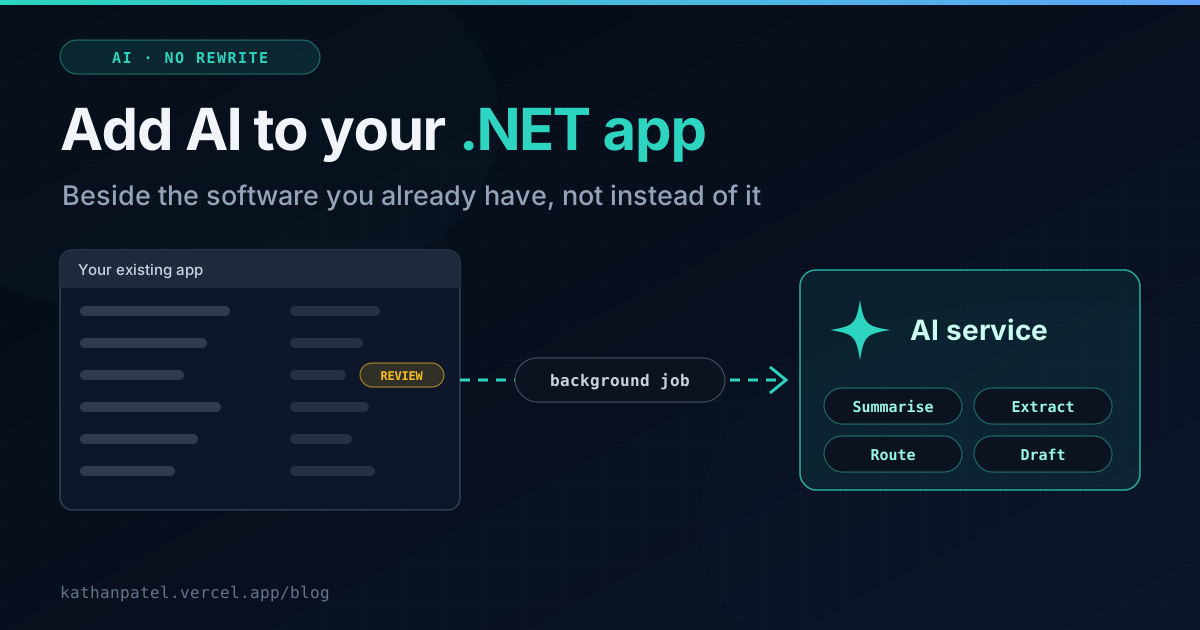
It can. From the app's point of view, an AI model is just another service it calls over the internet, like a payment gateway or an email provider. That means it can be added beside what you already have, one feature at a time, without touching the parts that work.
I build AI features into .NET and web software, including the AI assistant and the project cost estimator on this site, which run on a production AI model with rate limiting and a check on every response. This post covers what I tell clients before they spend anything.
Where AI actually helps in business software
Forget chatbots for a moment. In day-to-day business software, AI earns its keep in five kinds of task. All of them are jobs where a person currently reads something and then types something:
• Summarising. Turning a long call transcript, email thread or case history into a summary someone can read in thirty seconds.
• Extracting. Pulling structured fields (names, dates, amounts, reference numbers) out of invoices, forms, scanned documents and photos, so nobody has to retype them.
• Sorting and routing. Reading incoming emails, tickets or enquiries and deciding which team, which priority and which category.
• Searching your own documents. Answering questions from your policies, contracts or knowledge base, with references back to the source. You'll hear this called RAG.
• Drafting. First drafts of replies, reports or descriptions, which a person then checks and sends.
I've written about two of these in detail: extracting structured data from images in .NET, and contract analysis and call summaries for legal tech.
Where it doesn't
AI models are very good with language and unreliable with certainty. Keep them away from:
• Calculations and totals. Your existing code does maths correctly every time. Let it.
• Final decisions with consequences. Approving a payment, rejecting a claim, sending legal advice. AI can prepare these; a person should make them.
• Anything that must be identical every time. The same input can produce slightly different output. For a summary, that's fine. For a compliance record, it isn't.
Let AI do the reading and the first draft. Let your existing code do the maths. Let a person make the decision.— Kathan N. Patel
How to add it without a rewrite
The pattern I use keeps the AI feature separate from the core of the app, so it can be added, improved or switched off without putting anything else at risk.
1. Run it in the background
AI calls take seconds, not milliseconds, and they occasionally fail. So they shouldn't happen while a user waits on a screen. Instead, the app queues the work ("summarise this call", "extract this invoice") and a background job does it. In .NET I use Hangfire for this. It's the same tool I've used for scheduled data-sync jobs between legal practice platforms, and it retries automatically when an AI service is busy.
2. Treat every answer as a draft
The result is saved with a status such as "AI draft, needs review" and shown to a person, who accepts or corrects it. Over time you'll see how often corrections are needed, which tells you where you can trust it more and where you can't.
3. Check the output before using it
When AI extracts data, the app should check the result the same way it would check a form a person filled in: required fields present, dates that are real dates, amounts that are numbers. Anything that fails goes to a person instead of into your database. On this site's cost estimator, every AI response is checked like this before anyone sees it.
// Queued when an invoice is uploaded. The user never waits on the AI call.
BackgroundJob.Enqueue<InvoiceExtractionJob>(job => job.RunAsync(invoiceId, CancellationToken.None));

public class InvoiceExtractionJob(IInvoiceExtractor ai, AppDbContext db)
{
    [AutomaticRetry(Attempts = 3)]  // AI services get busy; retry instead of failing
    public async Task RunAsync(int invoiceId, CancellationToken ct)
    {
        var invoice = await db.Invoices.FindAsync([invoiceId], ct);
        if (invoice is null) return;

        var fields = await ai.ExtractAsync(invoice.FilePath, ct);

        // Checked like any other input. Nothing unchecked reaches the database.
        var valid = fields is not null
                 && !string.IsNullOrWhiteSpace(fields.SupplierName)
                 && fields.Total > 0
                 && fields.InvoiceDate <= DateOnly.FromDateTime(DateTime.Today);

        invoice.ExtractedFields = valid ? fields : null;
        invoice.Status = valid ? InvoiceStatus.AiDraftNeedsReview
                               : InvoiceStatus.NeedsManualEntry;
        await db.SaveChangesAsync(ct);
    }
}
4. Keep the provider swappable
Put the AI provider behind a single interface in your code, like IInvoiceExtractor above. Models improve and prices change every few months, so switching provider should be a configuration change, not a project. I've moved this site's own AI features from one provider to another, and it was a small change for exactly this reason.
"Our app is old. Can it still do this?"
Yes. Even an app on .NET Framework 4.8 can call an AI service, because it's a web request like any other. And if you'd rather not add new code to an old codebase, the AI work can live in a small, separate service on modern .NET that the old app talks to. That's often the cleaner option: the new service uses current libraries, and the old app changes very little.
It also gives you a head start if you're planning a migration later, because that new service is already on modern .NET. If you're weighing that too, see the real costs of migrating from .NET Framework.
Your data: the question to ask first
Before any customer data goes to an AI service, check the provider's terms for the exact plan you're using. The paid APIs from OpenAI, Anthropic and Google don't use your data to train their models by default, but free tiers can be different. Google's free Gemini API tier, for example, may use what you send to improve its products. That's fine for a demo. It isn't fine for client records.
If your data must stay in a particular region, or inside your existing cloud agreement, Azure OpenAI runs models inside your own Azure environment and region. For regulated work in legal, healthcare or finance, settle this before building anything.
Where to start
Pick one task that passes three tests: people do it many times a week, it involves reading or retyping, and a mistake would be caught before it caused harm. Build AI into that one workflow, with review, and measure the time it saves over a month.
A focused first feature like that typically takes two to four weeks to build and test. If it pays off, and for the right task it usually does, you'll know exactly where to go next, with real numbers instead of hype.
If you have a .NET app and a task you suspect AI could take over, tell me about it. I'll tell you honestly whether it's a good fit. Sometimes the answer is a simpler automation with no AI at all. You can read more about how I approach this work on the AI integration page.