Updated July 2026 — Google made major changes to the Gemini free tier between December 2025 and April 2026: quota cuts, Pro-class models going paid-only, mandatory spend caps on paid tiers, and a billing quirk that silently deletes your free tier. This post has been fully revised to reflect what the free tier actually looks like today.
Every developer eventually hits the same wall: you want to experiment with AI features in a project, prototype an idea, or validate whether a language model is even capable of what you need — and the first thing standing in the way is a billing page. OpenAI wants a card on file. Anthropic has a credit system. Azure AI requires a subscription. It creates friction exactly when you need none.
Google's approach is different. The Gemini API, accessed through Google AI Studio, offers a free tier that does not require a credit card, does not expire, and gives you access to real production-grade models — including the current-generation Gemini 3.5 Flash, the high-volume Gemini 3.1 Flash-Lite, and the still-available Gemini 2.5 family. For developers who want to explore, prototype, or integrate AI capabilities into a side project or client build, this remains the most frictionless entry point available right now — but the fine print has changed, and it is worth understanding exactly how.
Why Free API Access Actually Matters
The advantages of having a free API tier go beyond just saving money. Here is what genuinely changes when you have no-cost access:
1. You can validate before you commit. Before wiring AI into any production feature, you need to know whether the model handles your specific use case — your data format, your language, your domain. Free access lets you test thoroughly before any budget decision is made.
2. Side projects become feasible. Not every project has a client budget or venture backing. Personal tools, open-source experiments, and portfolio builds can now include real AI features without a monthly cost that makes the project economically unviable.
3. Learning has no risk. Prompt engineering, context window management, structured output formatting, function calling — these are skills that require hands-on experimentation. A free tier means you can iterate aggressively without watching a cost meter.
4. Client demos are cost-free. If you are building a proof of concept to show a client what AI integration could look like in their product, free API access means the prototype phase costs you only your time.
5. No billing surprises. The free tier has rate limits, not a credit limit. There is no card on file, so you cannot accidentally run up a large bill during a late-night debugging session.
Where Should an IT Professional Actually Use This?
Free API access is not just for hobby projects. There are several professional contexts where it is the right tool to reach for:
Internal tooling and automation. Many IT teams build internal scripts and dashboards that would genuinely benefit from natural language processing — summarising logs, categorising support tickets, generating first-draft responses to repetitive queries. These tools rarely have a dedicated AI budget, making the free tier a practical fit.
Proof-of-concept builds for client proposals. Before a client approves an AI feature on a paid project, they want to see it. Building a working demo on the free tier is a legitimate strategy that keeps pre-sales work cost-neutral.
Data exploration and content processing pipelines. When working with unstructured data — documents, customer feedback, raw text exports — Gemini's API can handle classification, extraction, and summarisation tasks at volumes that fit comfortably within the free rate limits during development.
Developer onboarding and training. If you are introducing your team to AI-assisted development, the free tier gives every team member their own API key to experiment with, without requiring IT to provision paid seats.
CI/CD and code review tooling. Light AI integrations — commit message generation, PR description drafts, test coverage suggestions — are well within free tier limits when triggered per-commit rather than per-line.
How to Get Your Free Gemini API Key — Step by Step
The process takes under five minutes. Here is the complete walkthrough:
Step 1 — Go to Google AI Studio. Open your browser and navigate to aistudio.google.com. You do not need a Google Cloud account. A standard Google/Gmail account is sufficient.
Step 2 — Sign in with your Google account. Click Sign in and use any existing Google account. If your organisation uses Google Workspace, a work account works equally well.
Step 3 — Accept the terms of service. On first login, Google AI Studio will prompt you to accept the Gemini API terms. Read them if you intend to use this in a commercial context — the free tier has specific clauses around data use for model improvement that you should be aware of.
Step 4 — Click "Get API key" in the left sidebar. Once inside the Studio, look for the Get API key option in the navigation (or go directly to aistudio.google.com/apikey). This opens the API key management screen.
Step 5 — Click "Create API key". You will be prompted to either associate the key with an existing Google Cloud project or create a new one. For free tier usage, creating a new project is fine — do not enable billing on it. This matters more than it used to: the free tier only exists on projects with billing disabled (more on this trap below).
Step 6 — Copy and store your key securely. The API key is shown once. Copy it immediately and store it in a .env file or a secrets manager. Never commit it to a repository.
Step 7 — Test your key. A quick curl command confirms everything is working before you touch any application code:curl -H 'Content-Type: application/json' -d '{"contents":[{"parts":[{"text":"Hello"}]}]}' 'https://generativelanguage.googleapis.com/v1beta/models/gemini-3.5-flash:generateContent?key=YOUR_API_KEY'
A JSON response with a generated reply means your key is active and the free tier is live. Yes — that model string is Google's current flagship Flash model, and it is on the free tier.
What You Actually Get on the Free Tier (Mid-2026)
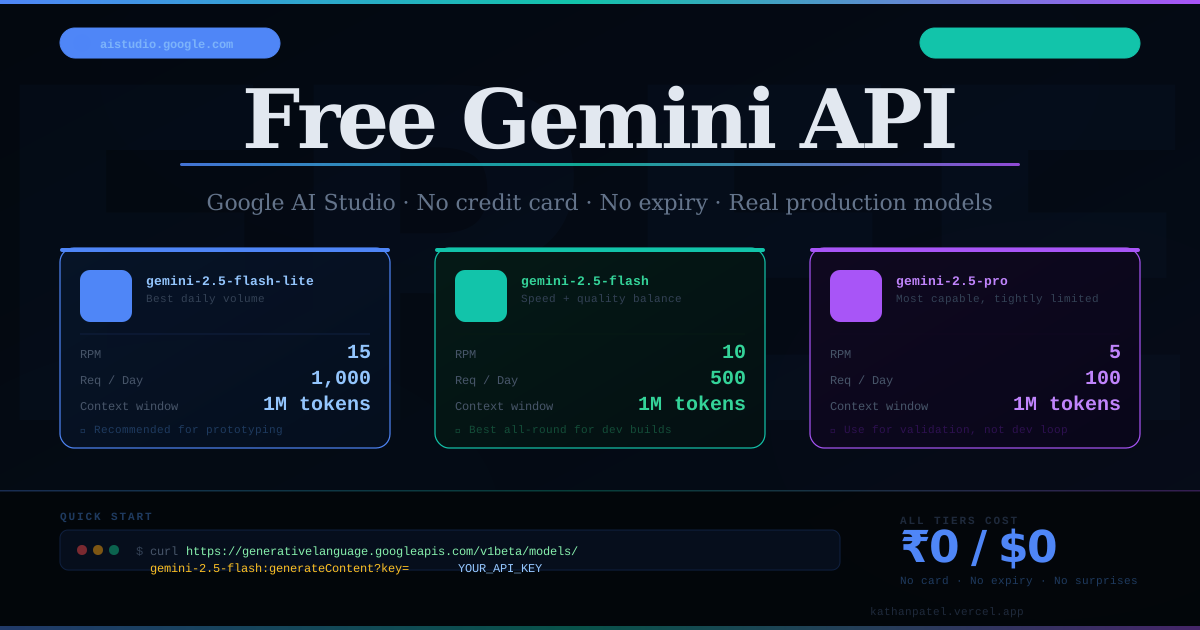
The free tier is still more capable than most developers expect — but the lineup looks different than it did a year ago. One important process change first: Google no longer publishes one fixed public table of free-tier rate limits. Limits now vary by model, project, and account status; the official docs direct you to the live rate-limit view inside Google AI Studio for your project's actual numbers. Limits are applied per Google Cloud project (not per API key — multiple keys share the same quota), and daily quotas reset at midnight Pacific time. The figures below are the commonly reported ballparks for mid-2026; treat them as a snapshot and verify yours in AI Studio before you build.
Gemini 3.5 Flash — the Current Flagship, and It Is Free
This is the headline most developers miss. Google's newest and most intelligent Flash model — the one positioned as frontier intelligence built for speed — is free-tier eligible for standard requests. If you want to know what current-generation Gemini is actually capable of in your domain, you no longer need a billing account to find out.
• Rate limits: Flash-class free limits are modest (roughly 10 RPM and a few hundred requests per day is typical) — check AI Studio for your live figures
• Context window: 1 million tokens
• Cost: ₹0 / $0
Gemini 3.1 Flash-Lite — the High-Volume Workhorse (Recommended for Prototyping)
Now generally available (no longer a preview), this is Google's most cost-efficient model, optimised for high-volume tasks like classification, translation, summarisation, and simple data processing. It carries the most generous daily allowance on the free tier, which makes it the default choice for iterating quickly.
• Rate limits: commonly reported around 15 RPM and roughly 1,000 requests per day
• Context window: 1 million tokens
• Cost: ₹0 / $0
Gemini 2.5 Flash and 2.5 Flash-Lite — Still Free, Still Stable
The previous generation remains on the free tier and is a perfectly reasonable baseline if you have existing integrations. Commonly reported limits: around 10 RPM / 250 RPD for 2.5 Flash and 15 RPM / 1,000 RPD for 2.5 Flash-Lite, with a shared token-per-minute cap in the region of 250,000. Note that the older Gemini 2.0 Flash family was deprecated on June 1, 2026 — if anything you run still points at a 2.0 model, migrate it now.
Pro-Class Models — Mostly Paid Now
This is the biggest change of 2026. As of April 1, 2026, the Gemini 3.x Pro models — including Gemini 3.1 Pro — have no free tier at all; Google's pricing page lists them as paid-only at any request volume. Gemini 2.5 Pro remains the one Pro-class model with free access, but with a very small daily cap (commonly reported around 5 RPM and 100 requests per day). Treat it strictly as a validation tool, not a development workhorse — and design your application around Flash-class models.
What else is NOT on the free tier:
Grounding with Google Search and Google Maps is a paid-tier feature, as are the video/image generation models (Veo, Nano Banana Pro) and priority throughput.
Important note on data privacy (unchanged): On the free tier, Google may use your API inputs and outputs to improve their products — this is stated directly on the official pricing page. On the paid tier, it is not. If you are working with sensitive client data, either use test or synthetic data during development, or upgrade to a paid tier.
The 2026 Changes You Cannot Afford to Miss
If you last looked at the Gemini free tier in 2025, four things have changed — and one of them is a genuine trap.
1. December 2025: free quotas were cut sharply. Google reduced free-tier daily quotas across models with little warning — widely reported at 50–80% depending on the model. The lesson generalises: free quotas are a gift, not a contract. Prototype on them; never build a production dependency on them.
2. April 2026: Pro went paid, and spend caps arrived. The 3.x Pro models were removed from the free tier entirely. At the same time, Google introduced spend controls on paid tiers: Tier 1 accounts have a monthly billing cap of $250 (Tier 2: $2,000) plus a spend-based rate limit of $10 per rolling 10 minutes on Tier 1. These protect you from runaway bills, but they also mean a growing app can hit a hard ceiling — plan your tier upgrades before you need them.
3. The billing trap: enabling billing deletes your free tier. Unlike most Google Cloud services, the Gemini API's free tier applies only while billing is disabled on the project. The moment you link a billing account to a project, every call on that project becomes billable from the first token — including calls that would have fit inside the free quota. The clean workaround is two projects: Project A with billing disabled for prototyping and experiments (free tier stays active forever), and Project B with billing enabled for anything production-facing.
4. Old models are being retired. Gemini 2.0 Flash and 2.0 Flash-Lite were deprecated on June 1, 2026. Copy-pasted tutorials from 2024–2025 that reference 1.5 or 2.0 model strings will fail — use gemini-3.5-flash, gemini-3.1-flash-lite, or the 2.5 family.
Why This Is Particularly Useful for Developers — A Real Example
Let me give you a concrete example from a recent project rather than a hypothetical. I was building Craftura Fine Furniture — a full-stack Next.js 14 website for a furniture manufacturing client based in Ahmedabad. The platform includes a customer-facing storefront, an inquiry cart, an admin panel with analytics, and a blog/CMS.
One of the features in the roadmap was an AI-assisted product description generator — the admin would enter basic product specs (material, dimensions, style, finish) and the system would generate a polished, SEO-friendly product description for the storefront. Before committing to any paid API, I needed to answer two questions: Can the model actually produce furniture-domain copy that sounds professional? And how does it handle Gujarati-English mixed input, since the admin team works primarily in Gujarati?
I wired the Gemini 2.5 Flash free tier into a test route in the Next.js API layer — took about 20 minutes including reading the docs. The setup looked like this:
// app/api/test-ai/route.ts — temporary validation route (not shipped to production)
import { NextRequest, NextResponse } from 'next/server';

const GEMINI_API_KEY = process.env.GEMINI_API_KEY;
// Running this validation today? Just swap the model string to 'gemini-3.5-flash'
// or 'gemini-3.1-flash-lite' — the endpoint pattern is unchanged.
const GEMINI_URL = `https://generativelanguage.googleapis.com/v1beta/models/gemini-2.5-flash:generateContent?key=${GEMINI_API_KEY}`;

export async function POST(req: NextRequest) {
  const { productName, material, dimensions, style, finish } = await req.json();

  const prompt = `
    You are a professional furniture copywriter. Write a compelling, SEO-friendly
    product description for an Indian furniture manufacturer's website.

    Product details:
    - Name: ${productName}
    - Material: ${material}
    - Dimensions: ${dimensions}
    - Style: ${style}
    - Finish: ${finish}

    Write 2-3 paragraphs. Use a warm, premium tone. Mention craftsmanship and durability.
    Output plain text only, no markdown.
  `;

  const response = await fetch(GEMINI_URL, {
    method: 'POST',
    headers: { 'Content-Type': 'application/json' },
    body: JSON.stringify({
      contents: [{ parts: [{ text: prompt }] }],
      generationConfig: {
        temperature: 0.7,
        maxOutputTokens: 512,
      },
    }),
  });

  const data = await response.json();
  const generatedText = data.candidates?.[0]?.content?.parts?.[0]?.text ?? 'No response';

  return NextResponse.json({ description: generatedText });
}
The result was immediate and genuinely useful. Gemini 2.5 Flash produced furniture copy that required minimal editing — it understood domain vocabulary (joinery, teak grain, mortise-and-tenon construction) without any fine-tuning or examples. It also handled mixed-language admin input gracefully, correctly interpreting Gujarati product names transliterated into English. Running the same validation today, I would point the identical route at gemini-3.5-flash and expect even better copy.
The entire validation phase — from first API call to a confident recommendation to the client — cost exactly ₹0 and stayed comfortably inside the daily free quota. That is the real value of the free tier in a professional context: you can derisk technical decisions with actual data instead of assumptions, before any budget is on the line. The feature subsequently made it onto the client's paid roadmap, and the API integration was already validated and partially built.
Free Tier vs Paid — When Should You Upgrade?
The free tier is the right choice for development, prototyping, internal tools with low-volume usage, and personal projects. You should consider upgrading to a paid tier (or Vertex AI) when:
• Your application needs more requests per day in production than the free quota allows (roughly 250–1,000/day depending on model)
• You need a Pro-class model from the 3.x generation — these are paid-only since April 2026, at any volume
• Your client or organisation has data privacy requirements that preclude model training on your inputs (paid tier content is not used to improve Google's products)
• You need features like grounding with Google Search, context caching at scale, the Batch API's 50% cost reduction, or enterprise support
Two practical notes when you do upgrade. First, enable billing on a separate project so your free-tier project keeps working for experiments. Second, know the ceilings going in: Tier 1 carries a $250/month billing cap and a $10-per-10-minutes spend rate limit, which pause requests when exhausted — fine for most small products, but worth planning around if you expect fast growth. Until you hit those thresholds, the free tier is not a hobbled version of the real thing — it is the real thing, with rate limits.
Getting Started Today
The barrier to having a working Gemini API integration in your next project is about five minutes of setup and ten lines of code. The free tier removes every financial excuse for not experimenting with AI features. Whether you are building a client product, an internal tool, or just trying to understand what these models are actually capable of in your domain — there is no reason to wait for a budget approval to find out.
Head to aistudio.google.com, generate your key on a project with billing disabled, and start with Gemini 3.1 Flash-Lite for the highest daily volume — or Gemini 3.5 Flash when you want current-generation quality. Then open the rate-limit view in AI Studio to see your project's live quotas, because those numbers — not any blog post, including this one — are the source of truth. The first thousand requests are on Google.